Media Composer
Media Composer Quick Tips: Managing Custom Project Presets
Use Media Composer’s Presets Manager to add, modify, or delete custom projects ▶️ https://bit.ly/3gcLgPD

Use Media Composer’s Presets Manager to add, modify, or delete custom projects ▶️ https://bit.ly/3gcLgPD
Discover how to use Media Composer’s Sync Lock feature to avoid sync breaks while trimming your sequence. ▶️ https://bit.ly/3gcLgPD
Learn how to use the Link feature to add video to your Media Composer project. ▶️ https://bit.ly/3gcLgPD
Learn how to use the Link feature to add audio to your Media Composer project. ▶️ https://bit.ly/3gcLgPD
Learn how to create a variable speed effect by adding keyframes to a Timewarp effect in Media Composer. ▶️ https://bit.ly/3gcLgPD
Learn how to import your video into Media Composer. ▶️ https://bit.ly/3gcLgPD
Learn how to import your audio into Media Composer. ▶️ https://bit.ly/3gcLgPD
Learn how to output and optimize your Media Composer video for smooth playback on YouTube. ▶️ https://bit.ly/3gcLgPD
Learn how to use Media Composer’s Splice-In function to build a rough cut. ▶️ https://bit.ly/3gcLgPD
Explore how to use drag-and-drop editing to add clips to your Media Composer sequence. ▶️ https://bit.ly/3gcLgPD
Speed up your editing workflow in Media Composer by using the Source Browser as a Bin. ▶️ https://bit.ly/3gcLgPD
Explore two ways to review your shots in the Timeline after you apply multiple effects in Media Composer. ▶️ https://bit.ly/3gcLgPD
Customize the Bin Container’s layout or how bins display in Media Composer to align with your workstyle and editing needs. ▶️ https://bit.ly/3gcLgPD
Learn how to use Media Composer’s Extend function to create split ends. ▶️ https://bit.ly/3gcLgPD
Discover how to save time in Media Composer by creating an export template for your custom YouTube setting. ▶️ https://bit.ly/3gcLgPD
Explore how to access existing or create new user profiles within an open Media Composer project. ▶️ https://bit.ly/3gcLgPD
Explore how to create a stringout sequence in Media Composer to speed up assembling a narrative scene in a film. ▶️ https://bit.ly/3gcLgPD
Use Media Composer’s FrameFlex feature to create pan and zoom effects that simulate camera movement. ▶️ https://bit.ly/3gcLgPD
Learn how to create a Media Composer project with custom settings for destinations like Instagram. ▶️ https://bit.ly/3gcLgPD
Discover how to use Media Composer’s Consolidate feature to create Avid native media files from linked media without re-encoding. ▶️ https://bit.ly/3gcLgPD
Discover how to use storyboard editing in Media Composer to quickly visualize and assemble scenes. ▶️ https://bit.ly/3gcLgPD
Discover what’s possible when you use Media Composer’s auto-nesting feature to add multiple effects in Media Composer. ▶️ https://bit.ly/3gcLgPD
Learn how to add fades to the beginning and end of your sequence in Media Composer. ▶️ https://bit.ly/3gcLgPD
This video show you simply how to choose and set your media storage location in Media Creation
This video will help guide you in the process of setting up Autosave and recalling from Avid Attic
This video will show you how to record voice over in Avid using the Audio Punch In Tool
This video will show you how to reset Avid if you’re having a performance issues. Using MCState and Media Database file reset
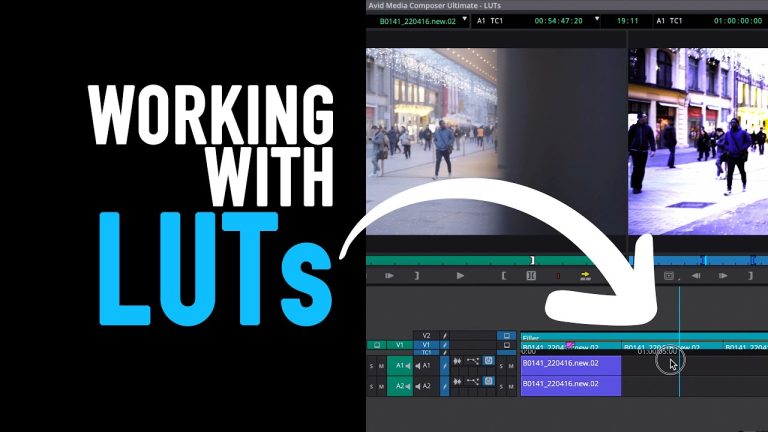
LUTs (Lookup Tables) can be helpful and are sometimes necessary to convert Log footage into Rec 709 or other more dynamic color spaces. In this
Hey Guys! This one is taking a de-tour from technical stuff to take a look at 5 different ways to lay out your rushes bins
Hey Guys! This one is just to cover making DNx transcodes for Avid in DaVinci Resolve. I’ve seen a bunch of people run into issues

Love it or hate it, Avid Media Composer is the dominant editing platform for film and television. It’s used in edit suites from New Zealand,
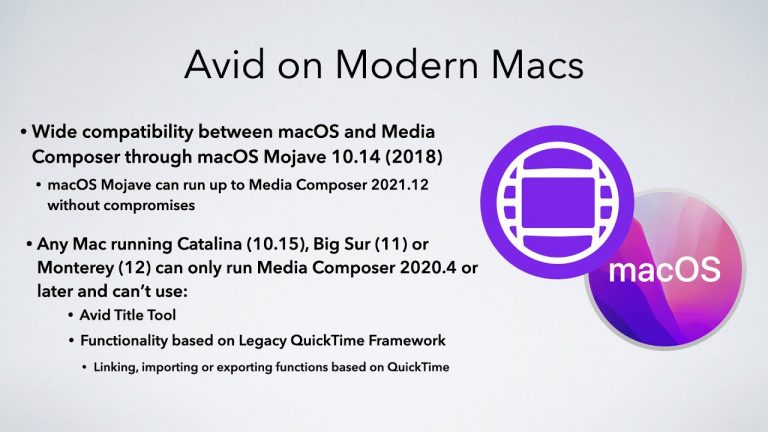
Beginning with Media Composer 2023.12, import and batch reimport now use UME and no longer require linking and transcoding! https://www.youtube.com/watch?v=ms-zN-aLars&t=495s Aside from the above change
Hey Guys, thanks for watching. Some nice new (if subtle) additions to Avid Media Composer in 2022.7

Hey Guys! Thank-you so much for watching!! You can treat this video as an FAQ of common support tips for Avid Media Composer. These are

Hey Guys, so since easily the most popular video so far was the first one going through some great features that may not be well-known
While it has been three years now, there are still many who have yet to make the jump from the old Avid Media Composer UI
This is a video highlighting and demonstrating my top 14 best features to have debuted since Avid changed the Media Composer UI (and code/engine/overhaul) back

Thanks Everyone for watching!! Macros are a huge part of my workflows these days and have honestly saved me countless hours at this point! I’ve
While it has been three years now, there are still many who have yet to make the jump from the old Avid Media Composer UI
While it has been three years now, there are still many who have yet to make the jump from the old Avid Media Composer UI
This video will show you how to make an End Of Edit from Avid. You use this process after you finish your picture lock and
The latest release of Avid Media Composer includes UI enhancements with the Command Palette Quick Find feature and Reverse Match Frame from the timeline context
This video will show how to get round importing MP4 files or other codec / wrappers that wont transcode into Avid. I show you how
This video will introduce you to the basics of the Avid Timewarp effect
This video will show you the basic of the Avid Titler+ Tool
This video gives you simple tips to change the track and clips colours in timeline on Avid for editors ease of preference.
This video will give you a basic overview of the changes from Avid 2018 to 2019 and the latest 2021 version
Learn Avid Media Composer! This is part 2 of the 101 tutorial series for absolute beginners. We continue looking at basic editing and timeline functions,

Hi, I’m the guy updating this site. I hope you enjoy it, and that it’s useful for you. I don’t make the videos here, but I do collect them and add it here, so you can find them.
If you enjoy this page, and you absolutely want to give something back for my work of collecting these, then here is my paypal.

